Your page only helps if guests open it. The easiest way to make that happen is to send the link at the right moment, in a message that tells them why it's useful. GoTuloy writes those messages for you, in English and Filipino, with your link and current stay code already filled in. This guide shows you how to use them, which one fits which guest, and how to set up the button guests press when they need to reach you.
Key takeaways
- Open Properties → Share for copy-ready messages for Airbnb chat, Messenger and Viber, in English and Filipino.
- Airbnb guests get messages inside Airbnb only. Messenger and Viber are for guests who booked with you directly.
- Each message has your page link and current stay code. Copy it fresh each time, because the code can change.
- Set the Message host button in Properties → Settings so guests can reach you from your page.
- Your link never changes when you edit your page, so a saved message or printed poster stays good.
1Which message goes where
This matters more than the wording. Airbnb's off-platform rules ask hosts to keep guest communication on Airbnb, so the channel depends on how the guest booked:
- Booked through Airbnb: send the Airbnb chat message inside Airbnb. Don't move the conversation to Messenger or Viber, and don't ask for the guest's number or handle.
- Booked with you directly: use Messenger or Viber, or wherever you already talk to them.
The page itself is safe to share on Airbnb. It never asks guests for an email, phone number or payment, and it's optional: guests don't need to sign up or install anything.
2Copy a ready-made message
- Open Properties and press Share on the property.
- Find the card for your channel: Airbnb chat, Messenger or Viber.
- Choose English or Filipino at the top of the card.
- Press Copy message, then paste it into your chat.
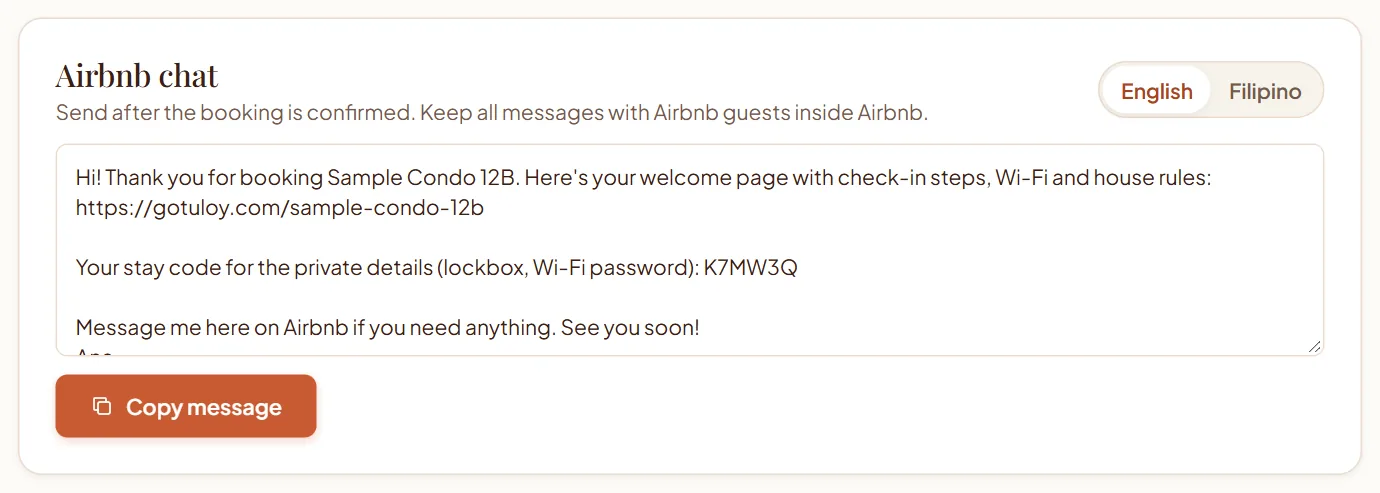
The Airbnb chat message with a sample link and stay code already filled in.
The Airbnb message thanks the guest for booking, gives the link and stay code, and tells them to message you on Airbnb. The Messenger and Viber versions are shorter, since those chats tend to be quick. All of them can be edited after you paste. Add a personal line if you like.
If your page isn't live yet, a notice warns you that the link won't open for guests until you publish.
3When to send it
A sensible rhythm for most stays:
- Right after booking: send the message, so guests can read your rules and how to get there.
- The day before arrival: a short reminder. If your stay code changes after each check-out, this is when to send the current one.
- On arrival day: many hosts send one line: "Everything's on your page, including how to get in."
On Airbnb, you can also add your page link to your Check-in instructions, House manual and Scheduled messages, so every guest gets it automatically. Send your page and stay code to guests covers where those are.
One caution with scheduled messages: the link stays the same, but your stay code may not. If you use monthly or after-check-out codes, leave the code out of long-lead scheduled messages and send it closer to arrival. Change your stay code and keep door details safe explains why.
4Make your link look good when shared
When you paste your link in many chat apps, it shows a small preview with your page name, your welcome message or area, and your cover photo. Two quick steps improve it:
- Add a wide Cover image in Basics. Your place makes a better preview than a default picture.
- Write a warm, short Welcome message.
Nothing from your Private section ever appears in a preview. After changing your cover, chat apps may keep showing the old preview for a while, as they save it on their side.
5Set up the Message host button
Your page has a button guests can press when they need you. Set it up once, under Properties → Settings, in the Airbnb card.
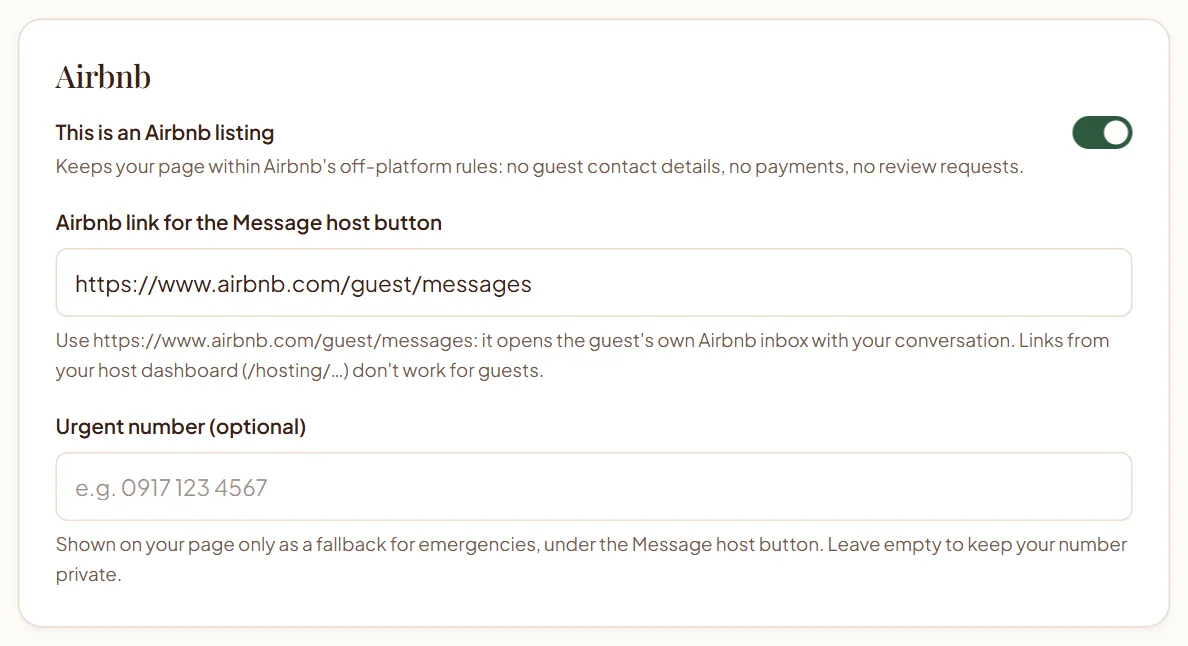
The Airbnb card in property settings.
- This is an Airbnb listing: leave it on for Airbnb properties. It keeps your page within Airbnb's rules.
- Airbnb link for the Message host button: use https://www.airbnb.com/guest/messages. It opens the guest's own Airbnb inbox with your conversation. Don't paste a link from your host dashboard: links with /hosting/ don't work for guests.
- Urgent number (optional): shown only as a fallback for emergencies, under the Message host button. Leave it empty to keep your number private.
Press Save settings. Guests then see the button near the top of your page, with your first name on it.
The button on a sample page. It opens the guest's Airbnb messages.
For a direct-booking page, turn off This is an Airbnb listing only if no Airbnb guests use that page, and add an urgent number so guests have a way to reach you.
6Messenger and Viber: good habits for direct bookings
- Pin the message. Ask your guest to pin it, or send it again on arrival day, so it doesn't get buried.
- Send link and code together. The templates do this, which saves a follow-up question.
- Keep the code out of group chats. A family group or barkada chat might include people who aren't staying. Send the code to your main contact.
- Don't send door codes directly if you don't have to. Sending the page and stay code means you update one place when a code changes.
7Other ways guests find your page
Not every guest reads every message. Your QR poster by the door catches those who didn't, and it never needs reprinting when you edit your page. Scans are counted separately in your stats, so you can see which works better. If you see few views, try sending the link earlier or adding one line that tells guests what they'll get, like "Lockbox and parking steps are on the page."
Frequently asked questions
Can I send my page link to Airbnb guests?
Yes, inside Airbnb. Your page doesn't ask for contact details or payment, and it doesn't ask guests to review you outside Airbnb. Keep important rules, especially building requirements, in your Airbnb listing as well. Your page explains them, and your listing is where guests agree to them.
Do guests need an account or an app?
No. The link opens in any phone browser, and they can read everything except the Private section straight away.
Why is there no email template?
Your page never asks guests for an email address, so there's no list to send to. Share your link wherever you already talk to the guest.
Can I change the page address?
Yes, under Properties → Settings → Page address. The old address keeps working, so anything you've already sent or printed won't break.
Can I edit the templates?
Not in the dashboard, but you can change anything after pasting it into your chat.
Will the Filipino message switch my page to Filipino?
No. Guests choose their language on the page. Turn on Show the Filipino language switch in Basics to give them the choice.